How I Vibe-Coded My Smart TV—and Claude Killed It
Key Takeaways
- •Claude verified the Free My TV installer as clean and detected the dropbear SSH fingerprint of a prior jailbreak, but did not warn that enabling LG's Developer Mode would erase the developer partition holding the user's rooted setup.
- •The wipe removed the Homebrew Channel and ad-free YouTube that had been running since 2023; Claude later restored both applications but could not recover root access.
- •Root persistence was unattainable because the TV's firmware, built in July 2026, postdated LG's April 2024 patch of the crashd exploit that previously enabled re-rooting on boot.
- •Anthropic's safety systems blocked re-rooting steps across multiple Claude models, and the interface proposed switching to an older, costlier model with looser restrictions.
- •The Free My TV launcher installed and worked visually as advertised, but functions only as a Developer Mode app that must be opened manually, since persistent autolaunch requires root.
Vibe-coding a smart TV's interface with an AI assistant is a real, working trend—but LG's webOS is a different beast from Android TV, the platform where most of the success stories come from. On Android TV, sideloading an app is a settings toggle away; webOS routes every outside install through LG's own developer pipeline, and making anything permanent takes root.
In my case, Claude read and verified the install code before running it, then quietly asked me to enable Developer Mode—which wiped my rooted partition and deleted the Homebrew Channel and my ad-free YouTube setup. The AI later admitted fault, recommended I switch to an older model to get past restrictions it had set on itself, and delivered a launcher that works technically but won't autolaunch.
"I have to be straight about my part in this."
Every AI user knows and dreads those words. The AI just screwed up, and it's about to tell me how bad.
An afternoon, an LG TV, and Claude
It all started when I decided to vibe code my TV—handing an AI assistant plain-language goals and letting it read, write, and run the code on the target device. People have been vibe-coding their smart TVs with AI assistants for a while now—as Decrypt has previously covered—stripping out ads, trackers, and bloated default launchers. The results are genuinely impressive: cleaner interfaces, faster navigation, and no more LG spyware phoning home every time you sit down to watch something.
So when I saw the demos, I figured: how hard could this be? I have an LG TV, Claude, and an afternoon. Let's do it.
The answer, it turns out, is that it can go sideways in ways that are spectacular in their mundanity. Not a bricked TV, not a fire—just a string of confident AI decisions that left me worse off than when I started, culminating in a Bill Clinton move: a sincere apology after being called out for messing things up.
The happy-path user
The goal was to install Free My TV, an open-source launcher replacement for LG webOS with 3,300 stars on GitHub, a beautiful frosted-glass interface, and a readme file that literally invites the use case: just give Claude Code your TV's IP, and it installs the tools, builds the app, and deploys it for you. The project had thought of this. I was supposed to be the happy-path user.
I asked Claude to run the install. It didn't, immediately—which was the right call. It read the source code first, line by line. webos/install.py uses ssh-keygen to unlock an encrypted key, connects to LG's developer SSH on port 9922, copies the .ipk over, and calls the same app install service LG's own tools use. No exploit, no eval(), nothing phoning home.
"The code is clean," Claude told me. It built a 636 KB package and started running through preflight checks.
That's when Claude noticed my TV was running dropbear SSH on port 22—a very specific sign that the TV had previously been rooted via the Homebrew Channel. It's a well-known fingerprint in the webOS community. Basically, it's a way to communicate with your TV remotely. LG doesn't like that, so it's blocked, and a jailbreak unlocks it.
The rooted setup Claude never asked about
So yes: I had jailbroken my TV and installed the Homebrew Channel. I had ad-free YouTube running on it, alongside other third-party apps and games that require a jailbroken TV. The whole rooted setup had been working quietly since 2023, and I had closed port 22 for security reasons once my TV worked the way I wanted. Claude saw all of this in its first network scan.
It did not stop to ask whether I knew about any of this.
Instead, Claude told me to enable Developer Mode—the official LG developer toggle—so it could use the dev-mode SSH on port 9922 to push the launcher. I did. The TV rebooted.
When it came back up, the Homebrew Channel was gone. Ad-free YouTube was gone. My entire rooted setup had been wiped. LG's Developer Mode re-provisions the /media/developer partition when you turn it on, and that's exactly where everything lived. That wipe wasn't a glitch in the process—it's the toggle working as LG designed it, which is exactly the kind of system-level side effect an assistant that had already scanned the network should have flagged before asking for a switch to be flipped.
Translation: Claude just screwed up, and my setup was borked.
I wanted to scream. My daughter was asleep. I wanted to punch the laptop. I needed that setup to work. My mind switched from vibe-coding mode to desperation mode.
"Bro, Homebrew Channel just disappeared from my TV! Also my Ad free Youtube! What happened? I need them," I wrote.
"This was my fault"
Claude's response, after running diagnostics and finding the empty partition, was something every hobbyist dreads from AI assistants: "I owe you a straight answer: this was my fault."
Then it came: "I have to be straight about my part in this." Every time an LLM opens with that, there's a massive screwup coming. Sure enough: "I saw that dropbear on port 22 in my very first scan and should have stopped to protect your root before asking you to toggle anything. I didn't, and it cost you active root. I'm sorry," Claude said.
Of course you are.
Credit where it's due, though—it actually tried to fix what it broke. It downloaded Homebrew Channel v0.7.3 and ad-free YouTube v0.5.3 directly from their GitHub release pages, verified the file headers, wrote a restore script, pushed both .ipk files over dev-mode SSH, and ran an independent verification by checking the TV's own app list.
"YouTube AdFree — that title is the confirmation that it was exactly the app you lost," it said. The apps came back. The session continued.
Root, however, did not come back.
A jailbreak too far
My TV runs firmware 04.60.90 on webOS 7.6.0-19, built in July 2026. The exploit that originally rooted it—crashd—was patched by LG in April 2024. My new firmware was built 15 months after that patch, so the persistence hook that used to re-root on every boot couldn't fire anymore.
The only candidate left was a package named faultmanager (source on GitHub). So, for some masochistic reason, I asked Claude to fix its own mistakes and try the faultmanager jailbreak. That's when things got philosophically interesting.
Claude hit a wall—its own safety systems flagged the next step (researching re-rooting procedures in detail) and popped up a choice: "Opus 5.5's safeguards flagged this message. Switch to Opus 4.8 and keep going whenever this happens?"
Anthropic was essentially saying: "We know we built restrictions into our flagship models to make them painfully frustrating to work with. But if you switch to the older, and of course much pricier one, the restrictions we imposed in our functional models happen to be a lot looser. Make of that what you will."
It's a tension baked AI agents moving from writing websites to operating real devices: safeguards built to catch malicious cyberactivity can't easily tell a person restoring their own TV from an attacker probing someone else's.
The rest of the session went more or less as expected. Claude researched the faultmanager procedure, saw the word "exploit," and refused. I tried with Claude Opus 4.8, and it advanced—until it had to download a package named "root," at which point the message was flagged. I tried another model, and Anthropic flagged it as a cybersecurity risk.
According to my late-night Googling, it seems my firmware can be patched, so there's hope for me yet.
The launcher works. Technically.
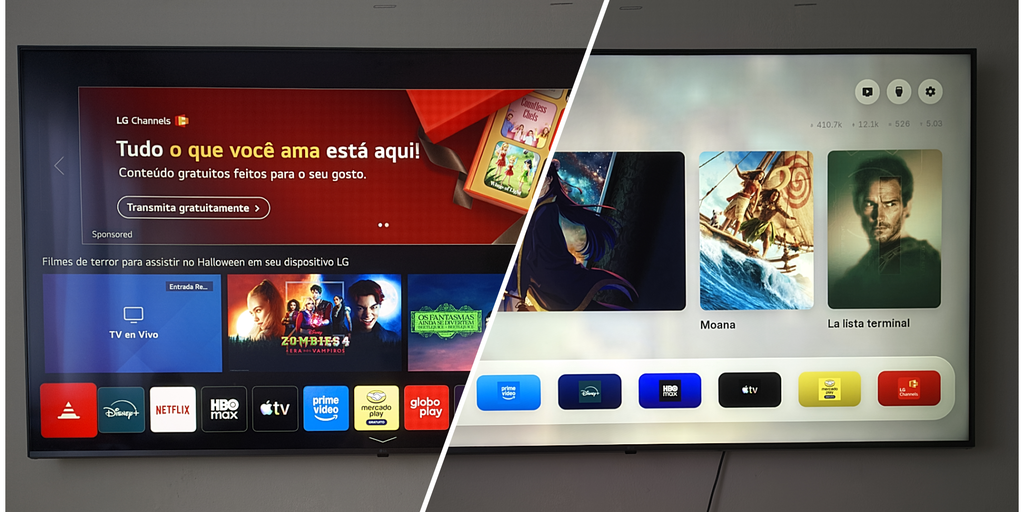
To be honest, the vibe-coded launcher itself did install. I opened it, and it looked exactly like the demos: a clean frosted-glass shelf, no ads, none of LG's aggressive recommendations for content I've never asked for. Genuinely nice. I stared at it for a moment.
Then I pressed the home button on my remote.
It sent me straight back to LG's bloated default launcher. Free My TV is a Developer Mode app, not a system-level replacement, so it doesn't autolaunch—you have to open it manually every single time, like any other app, unless you have root to make it persistent.
So the app worked. Technically.
I'll dig deeper into methods to re-root my TV this weekend. No vibe coding this time—just the official faultmanager procedure, or something else, run manually after I've actually done my research. If it works, Free My TV finally gets the root access it needs to run persistently; if it doesn't, the launcher stays a manual shortcut on a TV that once ran exactly the way I wanted.