Datalab Marker v2 vs MinerU, Docling, and LiteParse: Benchmark Breakdown
Key Takeaways
- •Marker v2 adds three conversion modes: balanced for GPU-based quality, fast for lower-cost processing, and a CPU-only no-OCR mode.
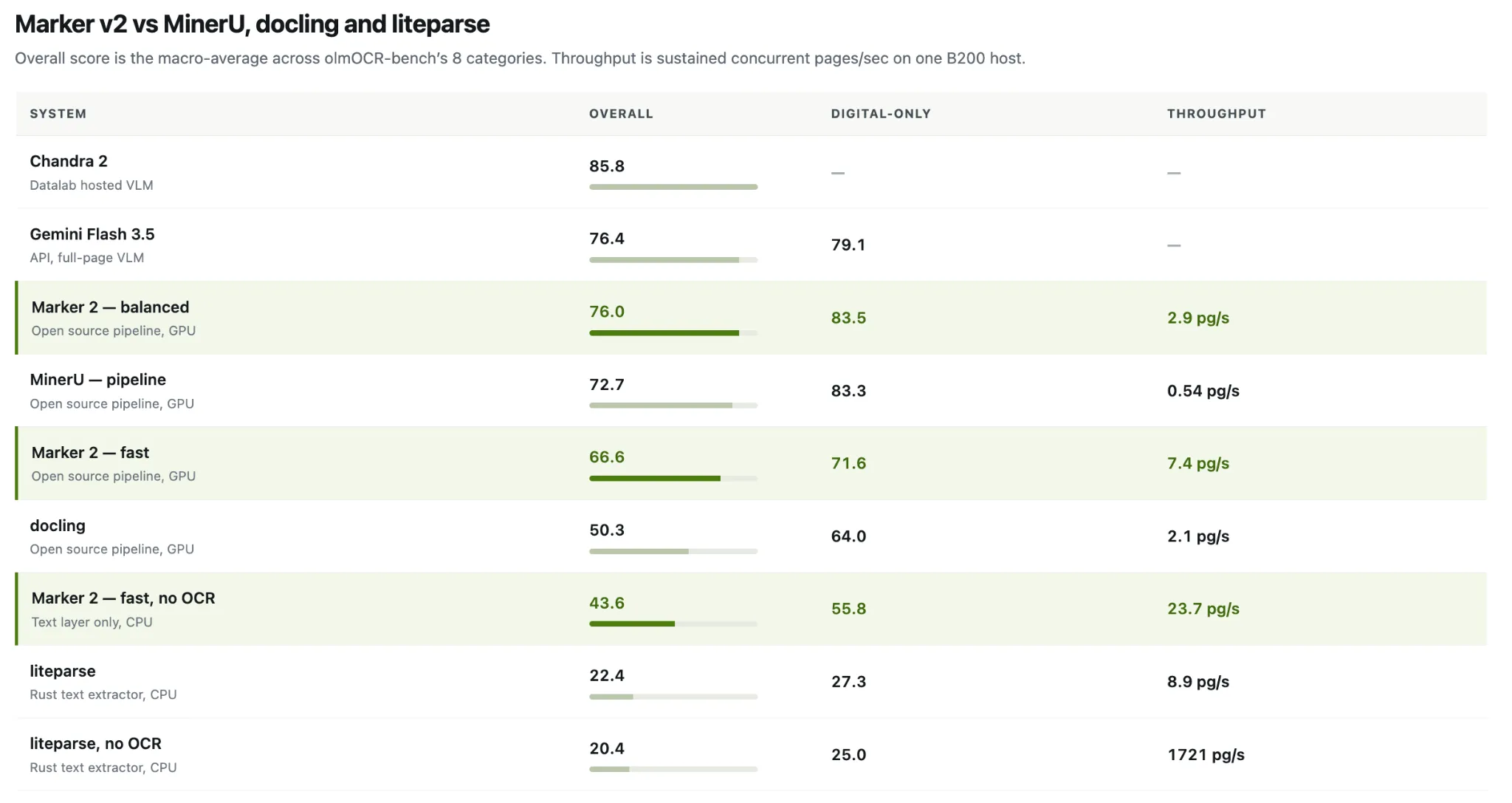
- •Datalab reports Marker v2 balanced mode scored 76.0% overall and 83.5% on born-digital PDFs on Ai2’s olmOCR-bench.
- •Marker balanced mode processed 2.9 pages per second on a single B200 GPU, compared with 0.54 pages per second for MinerU’s pipeline backend.
- •The release requires Python 3.10 or later and removes the structured-extraction converter and extractors.
- •Datalab says benchmark results are reproducible through an open harness, but teams should test against their own document sets and constraints.
Datalab has released Marker v2, a complete rewrite of its open-source document conversion pipeline. Marker transforms PDF, image, PPTX, DOCX, XLSX, HTML, and EPUB files into markdown, JSON, HTML, or chunks — output formats that serve as direct input for retrieval-augmented generation (RAG) systems, LLM training data preparation, and enterprise knowledge pipelines where parsing fidelity determines downstream model performance. The Datalab team rebuilt the tool around three components released over recent months: Surya OCR 2, a 20M-parameter fast layout model, and a rebuilt pdftext engine that is 3× faster than the prior version.
Headline benchmark results come from olmOCR-bench, a third-party benchmark created by Allen AI (Ai2). Marker v2's balanced mode achieves 76.0% overall and 83.5% on born-digital PDFs, sustaining 2.9 pages per second on a single B200 GPU. That throughput represents more than 5× the speed of MinerU's pipeline backend, which scores 72.7% at 0.54 pages per second. Docling scores 50.3% at 2.1 pages per second on the same harness.
What's New in Marker v2
Marker v2 introduces three conversion modes:
- Balanced — The Surya VLM handles layout, and full-page re-OCR is triggered whenever embedded text quality is poor. This is the highest-quality mode, optimized for GPU. Achieves 76.0% on olmOCR-bench.
- Fast — A lightweight rf-detr/onnx layout detector combined with pdftext, using minimal and targeted VLM calls. Scores 66.6% at significantly lower cost.
- –disable_ocr — Pure text-layer extraction with no VLM calls whatsoever. Runs entirely on CPU. Scores 43.6% at 23.7 pg/s.
Mode selection is now device-aware by default: balanced on GPU, fast on CPU/MPS, with manual override via –mode. Full CPU support constitutes the second structural change — fast mode with –disable_ocr requires no GPU and no inference server, yet the 20M-parameter layout model still parses columns, tables, and headers on CPU.
The third architectural change drives the throughput figures. Multiple lightweight CPU workers share a single Surya inference server, with the parent process managing VLM concurrency across them. As a result, throughput scales with server capacity rather than being limited by per-process VRAM. Datalab reports that balanced mode sustains approximately 2.9 pg/s compared to a ~0.3 pg/s single-stream rate on the same hardware.
Several breaking changes are notable before upgrading. Python 3.10+ is now required. Packaging shifted from Poetry to uv with hatchling as the build backend, though pip install marker-pdf remains unchanged. The structured-extraction converter and extractors have been removed; Datalab directs users to the hosted API or a –use_llm workflow as alternatives.
Benchmark Methodology
The scoring benchmark is olmOCR-bench from Ai2, comprising 1,403 PDFs with approximately 8,400 pass/fail unit tests covering math rendering, table structure, reading order, headers and footers, and old scans. The overall score is the macro-average across the 8 categories, computed using the official olmOCR-bench checker. Throughput figures represent sustained concurrent pages per second on a single B200 host, not single-stream latency.
Regarding provenance: while olmOCR-bench is a third-party benchmark from Ai2, all scores and throughput numbers come from Datalab's own test runs. All results are reproducible through the open harness in the Marker repository, which includes competitor runners for MinerU, Docling, and LiteParse alongside Marker's own. These numbers reflect one benchmark's document mix on a single hardware configuration, so results on other corpora may differ. Evaluating teams should run the harness against their own document sets for meaningful comparisons.
Marker v2 vs MinerU
MinerU's pipeline backend is the closest architectural counterpart, as both tools read the PDF text layer and apply OCR selectively. On overall score, Marker balanced leads 76.0 to 72.7. On born-digital documents, the two are effectively tied at 83.5 versus 83.3.
The meaningful separation is in throughput. Marker balanced sustains 2.9 pg/s compared to MinerU's 0.54 pg/s — a 5.4× gap at a higher accuracy score. Marker fast sustains 7.4 pg/s, approximately 13.7× MinerU's pipeline rate, though it scores 6.1 points below MinerU in exchange.
MinerU also offers a VLM backend, which Datalab notes scores higher than its pipeline backend. That backend uses a full-page VLM approach and is not included in this comparison table. Teams evaluating MinerU should benchmark that option separately.
Marker v2 vs Docling
Docling shows the widest performance margin among GPU pipelines. Marker balanced leads 76.0 to 50.3 overall and 83.5 to 64.0 on born-digital documents, while also running faster at 2.9 pg/s versus 2.1 pg/s. Datalab notes that Docling was evaluated using its default pipeline, which leverages the text layer for born-digital pages and OCR for image regions.
Docling's strengths lie in governance and format breadth rather than raw accuracy. The codebase is MIT-licensed, originated at IBM Research, and is hosted as a project within the LF AI & Data Foundation. Its supported input formats extend beyond documents to include audio and email.
Marker v2 vs LiteParse
LiteParse, developed by the LlamaIndex team, is a Rust-based document parser that operates on a fundamentally different axis. On CPU it scores 22.4 overall and 20.4 with OCR disabled, compared to Marker's CPU-only 43.6. However, LiteParse with OCR off reports 1721 pg/s — roughly 73× Marker's CPU mode throughput, representing a clear speed-over-structure tradeoff.
Marker's fast mode with –disable_ocr runs a 20M-parameter layout model on CPU and still recovers document structure, which explains why it more than doubles a plain text dump's score. LiteParse lacks a layout model and struggles with non-linear document layouts.
Marker v2 vs Full-Page VLM Tier
The Datalab team emphasizes that Marker is designed as a pipeline rather than a VLM, noting these are distinct categories of tools. The distinction carries practical weight: full-page VLMs process each document image end-to-end through a large model, achieving higher accuracy but incurring per-page compute or API costs that compound at scale. Pipelines like Marker decompose the task into cheaper specialized stages, trading peak accuracy for throughput and cost control. In this evaluation, Datalab's hosted Chandra 2 scores 85.8, while Gemini Flash 3.5 via API scores 76.4. Datalab's Chandra repository also positions Ai2's olmOCR 2 at 82.4 and dots.ocr 1.5 at 83.9 in a separate table. For scans, math-heavy pages, and achieving maximum accuracy, the VLM tier remains superior to all listed pipelines.
Notably, Marker's balanced mode narrows the gap to just 0.4 points behind Gemini Flash 3.5 overall and outperforms it on born-digital documents by a margin of 83.5 to 79.1 — without requiring a per-page API call.
Per-Category Behavior
The chosen mode affects the failure profile, not just the overall score. Math rendering is the most pronounced differentiator: fast mode reads equations from the PDF text layer rather than VLM-OCR, causing arXiv math scores to drop from 83.9 to 23.4, and –disable_ocr scores 0.0 in this category by design. Outside the two math categories, old scans is the weakest split across every mode, peaking at 43.2.
Licensing
Licensing terms diverge significantly across the four systems, which carries direct implications for commercial teams — particularly as document parsing often feeds regulated workflows where provenance and license compliance are auditable requirements:
- Marker: Code is Apache 2.0. Model weights use a modified AI Pubs OpenRAIL-M license — free for research, personal use, and startups under $5M in funding or revenue. Above that threshold, commercial use of the weights requires a paid license.
- MinerU: Now governed by the MinerU Open Source License, based on Apache 2.0 with additional conditions. A separate commercial license is required above 100M MAU or $20M monthly revenue, and online services built on it must disclose that fact.
- Docling: MIT-licensed, with model licenses tracked separately in their original packages.
- LiteParse: Open source, from run-llama, with LlamaParse positioned as the paid cloud option for processing difficult documents.
Use Case Considerations
Benchmark scores alone do not determine the right tool. Corpus type, available hardware, licensing tier, and required output format all factor into the decision. Teams processing born-digital PDFs at scale may find minimal accuracy differences between top pipelines, while those handling scanned documents, academic papers with dense math, or mixed-format corpora will see wider variance. Teams should evaluate each parser against their own document sets and operational constraints.
All benchmark and throughput numbers are accompanied by a reproducible benchmarks/ harness in the Marker repository.
Key References
- Marker v2 GitHub release
- Datalab Marker v2 blog post
- Announcement on X
- olmOCR-bench repository (Ai2)
Source: MarkTechPost

