Binance Web3 Wallet Review 2026: Fees, Features and Security
Key Takeaways
- •Binance Web3 Wallet is self-custodial, meaning users rather than the exchange control the private keys, unlike the custodial Binance exchange wallet.
- •Multi-Party Computation splits the private key into three shares, with at least two required for access, eliminating the need for a traditional seed phrase.
- •The wallet supports more than 60 public blockchains and connects directly to decentralized applications such as PancakeSwap and Uniswap.
- •Direct fees are limited to blockchain network fees and possible swap fees, while purchases through Binance Connect funded by a bank account may incur a platform fee of up to 2%.
- •Because the wallet is not available on the global platform in the United States, compliance requirements rather than the underlying technology determine where the feature can operate.
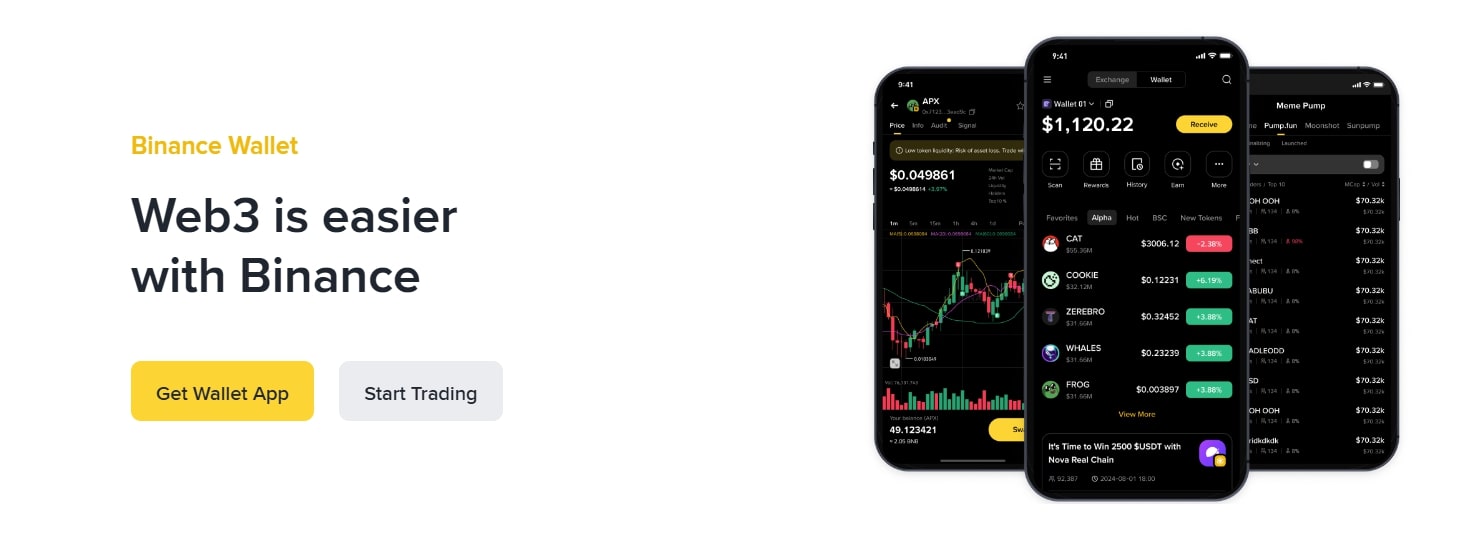
Binance Web3 Wallet is a self-custody cryptocurrency wallet built into the Binance mobile app. It allows users to store, manage and access digital assets across multiple blockchains without a browser extension or traditional seed phrase.
Its main features include Multi-Party Computation (MPC)-based key management, multi-chain support, decentralized application (dApp) integration, built-in swapping and bridging, an Airdrop Zone, security alerts and a unified interface. This review examines the wallet’s structure, advantages and limitations, supported countries, fees, security features and the steps required to create, use, recover, withdraw from and remove a wallet.
What Is Binance Web3 Wallet?
Binance Web3 Wallet is a self-custody cryptocurrency wallet integrated into the main Binance app. Unlike the standard Binance exchange wallet, where Binance holds digital assets on a user’s behalf, the Web3 Wallet is designed to give users control over their private keys and assets.
The wallet is intended to make Web3 more accessible to users with different levels of cryptocurrency experience. It uses Multi-Party Computation (MPC), a security technology that divides a private key into three separate shares stored in different locations. One share is secured by Binance, another is stored on the user’s device, and the third is encrypted with the user’s recovery password and saved to personal cloud storage such as Google Drive or iCloud. Access to the wallet requires at least two of the three key shares.
Users can transfer assets between the Web3 Wallet and their standard Binance exchange account. They can also exchange tokens using Binance Bridge and other decentralized exchanges (DEXs), including across networks such as Ethereum and BNB Chain. The wallet connects to dApps used for trading, lending and exploring non-fungible tokens (NFTs).
Built-in safety tools include warnings for incorrect addresses and alerts about potentially malicious smart contracts. The wallet is available through the Binance mobile app and does not require a browser extension or a traditional seed phrase.
Pros and Cons
Advantages
The main advantages of Binance Web3 Wallet are its integration with the Binance app, MPC-based key management, the absence of a seed phrase, dApp access, cross-chain swaps and customer support.
Ease of access: The wallet is built into the main Binance app, so users do not need to download a separate application. The integration also allows assets to be moved between a regular Binance exchange account and the Web3 Wallet through the app.
MPC-based security: Rather than relying on a traditional seed phrase, the wallet divides the private key into three shares stored on the user’s device, with Binance and in cloud storage protected by a recovery password. This arrangement is intended to make it more difficult for a single compromise to expose the entire key.
No seed phrase to remember: The MPC structure removes the need to manage a conventional seed phrase. However, users remain responsible for their recovery password and the key share stored on their device or in cloud storage.
dApp access: The wallet connects directly to decentralized exchanges, NFT marketplaces and DeFi protocols.
Cross-chain swaps: Users can swap tokens across several blockchain networks, including Ethereum and BNB Chain. The wallet attempts to identify transaction routes and fees through Binance Bridge and internal DEX routing.
Customer support: Unlike many self-custody wallets, Binance Web3 Wallet provides 24/7 customer support.
Limitations
The main limitations are the lack of a desktop application or browser extension, the user’s responsibility for security and the wallet’s dependence on access to the Binance app.
No desktop or browser extension version: The wallet can currently be accessed only through the mobile app. Users cannot manage assets or interact with dApps from a computer through a Binance Web3 Wallet browser extension.
User responsibility for security: Even with MPC, users are responsible for their device-based key share, cloud-based key share and recovery password. Because the wallet is self-custodial, Binance may be unable to recover funds if a user loses the device and forgets the recovery password.
Dependence on the Binance app: Access to the Web3 Wallet may be difficult if a user cannot access the Binance account or mobile application.
Binance Web3 Wallet vs. Binance Exchange Wallet
The Binance Web3 Wallet is a self-custody wallet that gives users control over private keys and digital assets within the Binance app. The Binance exchange wallet is a custodial wallet in which Binance holds cryptocurrencies for users on its centralized exchange.
The key distinction is who controls the private keys. With the Web3 Wallet, control is assigned to the user through the MPC structure. With the exchange wallet, Binance controls the assets held on the user’s behalf.
Is Binance Web3 Wallet Legitimate and Safe?
Binance Web3 Wallet is integrated directly into the Binance app. Binance is a globally known cryptocurrency exchange that operates under different regulatory frameworks in different jurisdictions and is used by more than 275 million people globally, according to the source material.
The wallet uses MPC technology, which is designed to reduce risks associated with losing or exposing a traditional seed phrase. It also includes risk controls such as suspicious-address alerts and offers 24/7 customer support.
The wallet’s MPC design requires at least two of three key shares to access the wallet. Binance cannot access the assets without the user’s permission under the described structure. Face ID, fingerprint authentication or a password lock can protect access on the device, while sensitive data is encrypted.
These features do not remove the user’s responsibility for safeguarding the device, recovery password and backup. Losing access to the required key shares or recovery information can prevent recovery of the wallet. This division of responsibility is the practical trade-off of self-custody: the described features protect the key structure itself, but a user’s backup and recovery habits determine whether access can actually be restored.
Supported and Restricted Countries
Binance Web3 Wallet is generally available in countries where the main Binance.com exchange operates. Binance.com serves more than 100 countries globally, including large parts of Europe and Asia, such as India, Thailand, Malaysia, Indonesia, Japan, the Philippines, Taiwan and Vietnam. It also operates in parts of the Middle East, including the United Arab Emirates, Saudi Arabia and Egypt, and parts of the Americas, including Brazil, Argentina, Mexico and Colombia. In practice, access to the Web3 Wallet therefore follows Binance.com’s regulatory standing in each market rather than being evaluated separately for the wallet itself.
Availability can be limited by international sanctions, regulatory requirements and other compliance restrictions. The source identifies the United States, Cuba, Iran, North Korea, Syria and the Crimea region among the countries or regions where Binance and consequently the Web3 Wallet are restricted or unavailable. Canada has also experienced restrictions on Binance services.
The Binance Web3 Wallet is not available in the United States through the global Binance platform. U.S. users are directed to Binance.US, a separate and independently operated platform designed to comply with U.S. regulations. The integrated Web3 Wallet feature was not available on Binance.US compared with the global Binance platform at the time described. The gap between the two platforms illustrates how compliance requirements, rather than the wallet’s underlying technology, determine where the feature can operate.
Main Features
Self-Custody With MPC
Binance uses MPC to divide the private key into three shares: one held by Binance, one stored on the user’s device and one encrypted in cloud storage. Two of the three shares are required to access the wallet, so no single location holds the entire key.
The wallet does not require a seed phrase. Users must back up the cloud-based share in iCloud or Google Drive before using the wallet. If one key share is lost, the other two may still allow the user to sign transactions. Under this structure, Binance cannot access the assets without the user’s approval, while the user retains self-custody.
Multi-Chain Support
A single Binance Web3 Wallet can manage assets from more than 60 public blockchains. Supported networks and ecosystems include the Move ecosystem, Ethereum, Bitcoin, BNB Chain, Solana, Polygon, Arbitrum, Tron and Cosmos.
The wallet displays assets from different chains in one interface. Users can bridge assets between chains and exchange tokens within the wallet. Binance Bridge and internal DEX routing are used to optimize token prices and gas fees for cross-chain operations.
dApp and DeFi Integration
The wallet provides access to decentralized finance platforms, NFT marketplaces and DEXs. Examples include lending and borrowing platforms and exchanges such as PancakeSwap and Uniswap.
Users can access these services from the Binance app without setting up a separate third-party browser or navigating a separate wallet application. The integration is intended to simplify access to the wider Web3 ecosystem. In practice, it shortens the path between a centralized exchange balance and DeFi participation: users can move assets from their exchange account to the Web3 Wallet and connect to protocols in a single app, rather than setting up and funding a separate wallet.
Security Controls
Built-in risk controls warn users when they attempt to send assets to an incorrect address or interact with a known malicious smart contract. The MPC system is designed to avoid a single point of failure, while Face ID, fingerprint authentication and password locks help protect on-device access.
Sensitive information is encrypted, and the wallet does not use a traditional seed phrase. Binance cannot access or revoke the key shares without the user’s approval under the wallet’s described MPC design. These measures apply during setup, transaction signing and regular use, but users remain responsible for their own backups and authentication credentials.
Unified Interface
Because the Web3 Wallet is part of the Binance app, users can view balances, manage portfolios and complete transactions through a single interface. Assets held on different blockchain networks are displayed in one location, reducing the need to switch between separate applications or complex menus.
Airdrop Zone and Reward Center
The wallet includes a Reward Center and Airdrop Zone for participating in Web3 project airdrops. Some campaigns use lucky draws, while others offer first-come, first-served participation.
Users can also stake BNB for 30, 60, 90 or 120 days and complete Web3 quests to earn Megadrop rewards. Scores from staking and quests can affect rewards. The source states that many users earn between $10 and $30 per campaign. Tasks, reward status and pending tokens are displayed in the Reward Center. Binance also provides early access through Alpha to new token launches before public listing. Because campaign mechanics, reward levels and early-access arrangements are set per campaign, the specific terms users encounter can vary from one campaign to the next.
Fees
The Binance Web3 Wallet’s direct fees include network fees, also called gas fees, and swap fees. Withdrawal, deposit and staking fees follow Binance’s general fee schedule and are separate from the wallet’s direct fees.
Network Fees
Network fees are charged by the relevant blockchain rather than by Binance. They apply when users send cryptocurrency, interact with a dApp or execute a swap because these actions require processing by network validators or miners.
The amount varies according to network congestion, transaction complexity and the blockchain being used. A simple transfer generally requires less computational work than interaction with a complex smart contract. Ethereum gas fees can therefore be much higher than fees on BNB Chain, depending on network conditions. For users active across several chains, this means the same basic action, such as a swap, can carry very different costs depending on the network used and its congestion at the time.
Swap Fees
A swap is an exchange of one cryptocurrency for another, such as exchanging ETH for USDT. Swap fees may apply. The source states that Binance has offered promotions waiving trading fees for swaps made through the integrated Swap and Bridge features in the Web3 Wallet. Network gas fees still apply.
Purchases made through Binance Connect using a bank account may involve a platform fee of up to 2%.
How to Create and Use a Binance Web3 Wallet
Step 1: Install the App and Open the Web3 Wallet
Install the official Binance mobile app from the App Store or Google Play. Sign in or create a Binance account with a valid email address or phone number, and complete identity verification (KYC) before accessing the Web3 Wallet.
After verification, open the app and select the Wallets tab. Choose “Create Wallet” rather than “Import Wallet” to begin creating a new wallet.
Step 2: Set a Recovery Password
Set a strong recovery password. The password encrypts one of the private-key shares, and Binance cannot see or reset it. After the password is created, the wallet generates three private-key shares through MPC. One share remains with Binance, one is stored on the device and one encrypted share is backed up to cloud storage if the user selects that option.
Step 3: Back Up the Wallet
Choose Cloud Backup, QR Code Backup or both. For Cloud Backup, link a Google Drive or iCloud account and confirm encryption with the recovery password.
Step 4: Use the Wallet
The wallet dashboard displays balances across supported chains, NFTs and transaction history. Users need the native token of a particular blockchain to pay that network’s gas fees.
To send tokens, tap Send, select the token and network, enter the destination address and amount, and confirm with the recovery password or biometric authentication. To receive tokens, tap Receive and copy or share the wallet address or QR code.
To move assets from the Binance exchange wallet to the Web3 Wallet, select Transfer, choose the source and destination accounts, enter the amount and confirm. To swap assets, select the tokens, approve the transaction and pay the applicable gas fee. To use a dApp, tap DApps, choose a dApp and connect through the wallet without leaving the Binance app.
How to Recover a Binance Web3 Wallet
A wallet can be recovered using a cloud backup or QR code backup together with the recovery password. The same device type linked to the backup may be required.
Step 1: Start the Import
Open the Binance app, go to Wallets and tap “Import Wallet.” For a cloud backup, sign in to the same Google or iCloud account used for the backup, then enter the recovery password to decrypt it.
For a QR Code Backup, select the QR Code method, scan the code and enter the recovery password. After validation, the wallet can restore balances, assets, NFTs and transaction history.
Step 2: Use the Appropriate Device Type
Recovery can be completed on a supported device using the same cloud platform or a QR code backup and the recovery password. An iCloud backup must be restored on an iOS device, while a Google Drive backup can be restored on an Android device. No seed phrase is required. The process restores the private-key shares and reopens the wallet with access to the assets.
Step 3: Reset Without a Backup
If the user did not create a backup and has lost access, the Quick Reset option may be available. If the app detects a wallet without a backup, Quick Reset can appear on the recovery screen. The user must contact Binance support, verify their identity and request a reset link.
After support authorization, the user receives temporary access to recreate the wallet. Previous assets are lost unless they were backed up.
How to Withdraw From Binance Web3 Wallet
Before withdrawing, users should ensure that the wallet contains enough of the blockchain’s native token to pay network fees. The process involves selecting a token, destination and amount, reviewing the transaction and waiting for blockchain confirmation.
Step 1: Prepare the Withdrawal
Open the Binance app and switch to the Web3 Wallet. Tap Transfer, choose the Web3 Wallet as the source account, and select either the Binance spot wallet or an external wallet address as the destination.
Step 2: Select the Token and Destination
Choose the token and blockchain, then enter the amount. Transfers to the Binance spot wallet follow the internal transfer process. The network fee applies to the transfer into a Web3 address. Transfers to external wallets require careful confirmation of the destination address. Users may need to add the address as a new beneficiary and confirm it by email or two-factor authentication (2FA).
Step 3: Confirm the Transfer
Review the estimated network fee, total amount and selected network. Authorize the transaction using the recovery password or biometric authentication, then tap Confirm. The pending transaction can be viewed in the transaction history. The tokens arrive after the necessary blockchain confirmations.
How to Remove a Binance Web3 Wallet
Because the Binance Web3 Wallet is self-custodial, removing it from the Binance app does not destroy the wallet or its assets. It removes the connection between the wallet and the Binance account. To stop using the wallet permanently, users should export the private keys, or the seed phrase if applicable, before removing it. Without the private keys or recovery information, the wallet may not be restorable. The process is similar to removing other non-custodial wallets such as Trust Wallet.
To remove the wallet, open the Binance app, go to Wallets and select the Web3 tab. Open the wallet’s settings or options menu and choose “Remove Wallet.” Confirm identity with the recovery password or biometric authentication.
The app displays a warning about removing the wallet and local key shares. Users must then decide whether to retain or revoke the cloud backup. Retaining the backup allows the wallet to be restored later. Revoking it prevents recovery through that backup.
After confirming the selection, the wallet is removed from the device. If a backup remains available, the wallet can be imported again.
Source: Crypto Ninjas

